
Vector Art Conversion Services for Logos, Apparel, and Branding
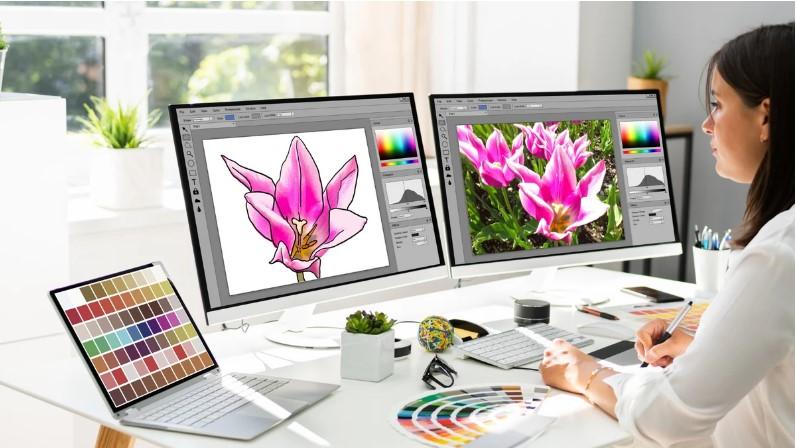
Good artwork is a key part of strong branding. A logo may look clear on a phone but lose its sharp look when it is made larger. This can cause poor results on shirts, signs, labels, banners, and other products. Vector artwork helps solve this problem because it can be scaled to many sizes while keeping clean edges.
If you need Vector Art Conversion Services, a skilled designer can turn a raster image into clean vector artwork that is ready for print and design work. The process is more than saving an image in a new format. It may involve tracing shapes, rebuilding curves, matching colors, and fixing small details. A well-made vector file can help your logo look clear on apparel, signs, labels, packaging, and other brand items.
What Is Vector Artwork?
Vector artwork is made with paths, points, lines, and shapes.
Raster images, such as JPG and PNG files, are made from pixels. When a raster image is made much larger, the pixels can become visible. The image may look soft or blurry.
Vector artwork works in a different way.
A vector design uses math-based paths. This lets the artwork grow or shrink without the same loss of sharpness.
Common vector formats include:
-
AI.
-
EPS.
-
SVG.
-
PDF.
The best format depends on how the artwork will be used.
Why Logos Need Vector Files
A logo may be used in many places.
For example, the same logo may appear on:
-
Business cards.
-
Shirts.
-
Hats.
-
Signs.
-
Websites.
-
Product labels.
-
Vehicle graphics.
-
Packaging.
-
Banners.
Each use may need a different size.
A vector logo gives you a flexible source file. You can use the same artwork for a small print or a large sign while keeping clean edges.
How Raster Images Become Vector Art
The conversion process starts with the source image.
The designer reviews the image and checks its lines, shapes, colors, and details.
The artwork is then rebuilt using vector paths.
Step 1: Review the Source Image
A designer first checks the image quality.
They look for:
-
Blurry edges.
-
Missing details.
-
Poor color areas.
-
Small shapes.
-
Uneven lines.
-
Background marks.
This helps set the right plan for the conversion.
Step 2: Trace the Main Shapes
The main parts of the artwork are traced or redrawn.
Simple logos may have only a few shapes. More detailed artwork may need many paths.
The goal is to create smooth and clean lines.
Step 3: Build Smooth Curves
Curves are important in logos.
Poor curves can make a logo look rough. Good vector work creates smooth paths that look clean at any size.
Step 4: Match the Colors
The designer checks the colors in the source artwork.
Exact color matching may depend on the source image and the final use.
For print work, the color setup may also need to match the printer's needs.
Step 5: Remove Unwanted Parts
Extra marks and background pieces are removed.
This makes the file easier to edit and use.
Step 6: Check the Final File
The artwork is checked at different sizes.
The designer should also check that shapes are closed, paths are clean, and no unwanted objects remain.
Vector Art for Logos
Logos are one of the most common uses for vector artwork.
A good vector logo should have:
-
Clean edges.
-
Smooth curves.
-
Correct colors.
-
Easy editing.
-
Clear shapes.
-
Proper spacing.
A clean logo can then be used across many brand items.
Keep the Logo Simple
Some logos have tiny details that may not work well in every size.
A small logo may need a simpler version.
This does not mean the main brand look must change. It means the artwork should be prepared for the size and product.
Vector Art for Apparel
Apparel often needs artwork that can be printed or used for other forms of decoration.
Vector files are useful for many apparel methods.
They can be used for:
-
Screen printing.
-
DTF printing.
-
Heat transfer.
-
Vinyl cutting.
-
Embroidery preparation.
-
Promotional apparel.
The final file may need changes based on the production method.
Apparel Artwork Needs Clean Paths
Clean paths are important for cutting and print work.
Extra points or rough curves can cause problems during production.
A well-built vector file helps keep the artwork clean and easier to work with.
Vector Art for Branding
Branding often uses the same logo in many places.
A company may need its logo for a website today and a large sign tomorrow.
A vector source file gives the design team more control.
It can also make future design work easier.
Use One Strong Master File
It is useful to keep a clean master vector file.
From this file, other versions can be made for different needs.
This can help keep the logo consistent across marketing materials.
Why Manual Vector Conversion Can Be Better
Automatic tracing tools can be useful for simple artwork.
But they do not always create clean results.
Automatic tracing may create:
-
Too many points.
-
Rough curves.
-
Extra shapes.
-
Broken paths.
-
Poor color areas.
Manual work gives the designer more control.
A skilled designer can decide which shapes need to stay and which parts should be rebuilt.
Vector Art and Embroidery
Vector artwork can also be a useful starting point for embroidery digitizing.
But a vector file is not an embroidery file.
Embroidery machines need stitch data.
The vector artwork must be digitized into stitches before it can be sewn.
A clean vector source can make that process easier because the shapes and outlines are easier to understand.
Still, the digitizer must consider fabric, stitch type, density, underlay, pull compensation, and design size.
Choosing the Right Vector Format
Different projects may need different formats.
AI
AI is widely used for editing vector artwork in design software.
EPS
EPS is often used for print and design work. It is useful when artwork needs to be shared between different systems.
SVG
SVG is common for web graphics and some cutting tools.
A PDF can hold vector artwork, but not every PDF is fully editable. Some PDFs may contain raster images instead.
Always check what is inside the file before using it for production.
How to Choose a Vector Conversion Service
Choosing the right service can save time and reduce design problems.
Check Real Samples
Look at before-and-after examples.
Check curves, small details, color work, and overall line quality.
Ask About Manual Work
Find out if the artwork is manually cleaned and rebuilt when needed.
Check File Formats
Make sure the service can provide the format you need.
Ask About Revisions
A clear revision policy can help if changes are needed.
Consider Turnaround Time
Fast service is useful, but quality should come first.
A rushed file that needs more work later may cost more time.
Common Vector Conversion Mistakes
Using Automatic Tracing for Everything
Automatic tools can leave rough paths and extra points.
Keeping Too Many Details
Not every tiny detail is needed in a logo.
Ignoring Color Needs
Print and digital work may use different color settings.
Not Checking Paths
Open paths or extra shapes can cause issues during production.
Using a Low-Quality Source
A very poor image may need more manual work before it becomes a clean vector.
Vector Art for Promotional Products
Promotional products often use logos in many sizes and shapes.
These may include:
-
Pens.
-
Bags.
-
Mugs.
-
Signs.
-
Labels.
-
Stickers.
-
Key tags.
-
Apparel.
A clean vector file gives the production team a better source to work from.
How Good Vector Art Saves Time
A clean file can make future work easier.
You may need to:
-
Change a color.
-
Resize the logo.
-
Remove the background.
-
Create a one-color version.
-
Add the logo to a new product.
With a good vector master file, these tasks are often easier than working with a low-quality raster image.
Why Quality Matters for Business Branding
Your logo represents your business.
A blurry or rough logo can make a product look less polished.
Clean artwork helps create a more consistent brand image.
This matters when your logo appears across many products and marketing channels.
The Role of Experience
Vector conversion is not only about using software.
Good work also needs design judgment.
The designer must know how much detail to keep, how to make curves smooth, and how to prepare the file for its final use.
Absolute Digitizer focuses on clean artwork that can support print, apparel, branding, and other production needs.
A careful workflow helps reduce errors and gives customers artwork that is easier to use.
Final Quality Check
Before the final file is sent, check:
-
Are all lines smooth?
-
Are curves clean?
-
Are colors correct?
-
Are unwanted objects removed?
-
Are paths closed where needed?
-
Is the artwork easy to edit?
-
Is the file saved in the right format?
-
Does it look good at both small and large sizes?
These checks can prevent many production problems.
Final Thoughts
Vector artwork gives logos and brand graphics the flexibility they need for modern design and production.
It can help keep artwork sharp across different sizes. It can also make logos easier to edit and prepare for print, apparel, signs, and promotional products.
The best results come from clean source artwork and careful conversion. Manual review is often important, especially when the original image is small, blurry, or full of fine detail.
Absolute Digitizer provides vector artwork support for businesses and designers who need clean, scalable files for different uses.
If your current logo is only available as a JPG or PNG, converting it into a well-built vector file can give you a much stronger source for future design and production work.

 Turkish